

What is client logging in Chairlog?
Client logging is Chairlog’s core feature: one card per client with the service price, tip and product sale, added together into a running total for the day.
Chairlog’s Today screen shows the date, the total earned and how many clients you had. Under each client name, Chairlog shows the full amount plus colored markers for tips and products, so you can scan where each payment came from.
How do I log a client?
- Open Today. Chairlog opens on Today, showing the date, your running total and today’s clients. Swipe the week strip to pick another day.
- Tap Add client. Type a name (returning clients autocomplete) or tap a calendar chip to add an appointment as a client.
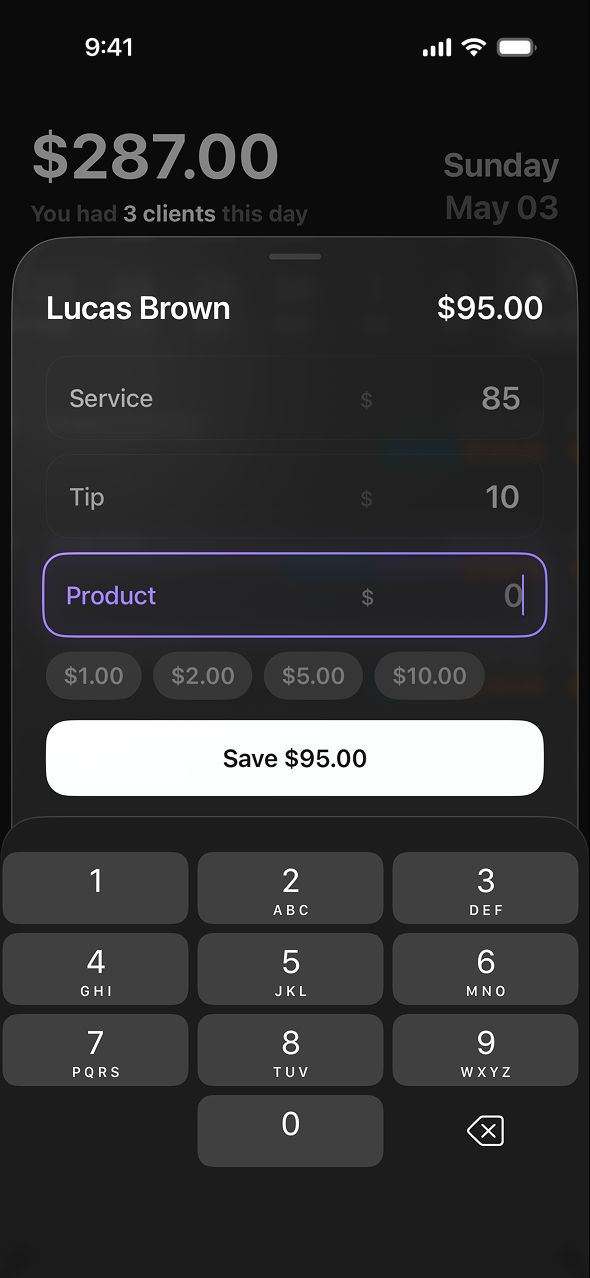
- Enter amounts. Enter the service price, then the tip and product sale if any. Quick presets help you add common tip and product amounts with one tap.
- Save. Tap Save. The client card shows the total with tip and product amounts marked separately, and the day total updates instantly.

What can I record for each client?
| Field | What it is for |
|---|---|
| Client name | Who you served. Autocompletes from past visits. |
| Service | The price of the cut, color, treatment or other service. |
| Tip | Cash or card tips. Can be hidden in Settings if you don’t take tips. |
| Product | Retail product sales. Can be hidden in Settings. |
Amounts display in your chosen currency — USD, EUR, GBP, PLN, UAH — with thousands grouped (1,250 instead of 1250).
Why log clients one by one instead of a daily total?
Logging per client gives Chairlog the detail it needs for Analytics: how many clients you see per day, your average ticket, and how much of your income comes from tips and retail. A single daily number can’t tell you any of that.
Frequently asked questions
How long does it take to log a client in Chairlog?
Logging a client in Chairlog takes a few seconds: tap Add client, type or pick the name, enter the service amount and tap Save. Tips and products are optional extra fields.
Can I log tips and product sales separately from services?
Yes. Each Chairlog client card has separate fields for service, tip and product, and Chairlog keeps separate totals for each so you can see how much came from retail and tips.
Can I add clients to a past day?
Yes. Swipe the week strip or use the arrow on Today to go to any earlier day and add or edit clients there. You can also edit a day from History.
Does Chairlog remember my regular clients?
Yes. Chairlog suggests names you have logged before as you type, so returning clients take one tap.